





Father’s day bundle ideas from brands doing gifting right
See how brands are using Father’s Day product bundles to make gifting easier and drive larger carts.
Apr 17, 2026 · 5 min
Understanding which one applies to you can save a lot of confusion when you're reviewing orders or troubleshooting fulfillment.

Apr 17, 2026 · 5 min
Basil is the Co-Founder and CTO of Simple Bundles, where he leads product strategy and development. With deep experience building scalable systems for merchants, he specializes in the technical and operational challenges for back-office operations.
You check an order in Shopify and see only the child products listed. No parent bundle anywhere. The next day, a different order shows both the parent bundle and the child items. Same bundle, same price, completely different order structure.
What's going on?
If you're using Simple Bundles, two different systems are working together to make sure your bundle orders process correctly regardless of where they come from. The method that handles your order depends entirely on how and where your customer checked out.
Here's the thing about bundle order processing: Shopify doesn't treat all sales channels equally when it comes to checkout capabilities. So Simple Bundles uses two approaches to cover all your bases. Understanding which one applies to you can save a lot of confusion when you're reviewing orders or troubleshooting fulfillment.
Before diving into the technical details, let's figure out what actually matters for your store.
Do you only sell through your online store checkout?
If yes, you only need to think about Cart Transform. That's it. The order editing method won't apply to your orders.
Do you sell through multiple channels like Shop app, Amazon, TikTok, Recharge, Skio, or other third-party apps?
If yes, both methods will be active in your store. Cart Transform handles online store orders, and order editing handles everything else.
Are you using Shopify POS?
Cart Transform works here too, so POS orders follow the same pattern as online store orders.
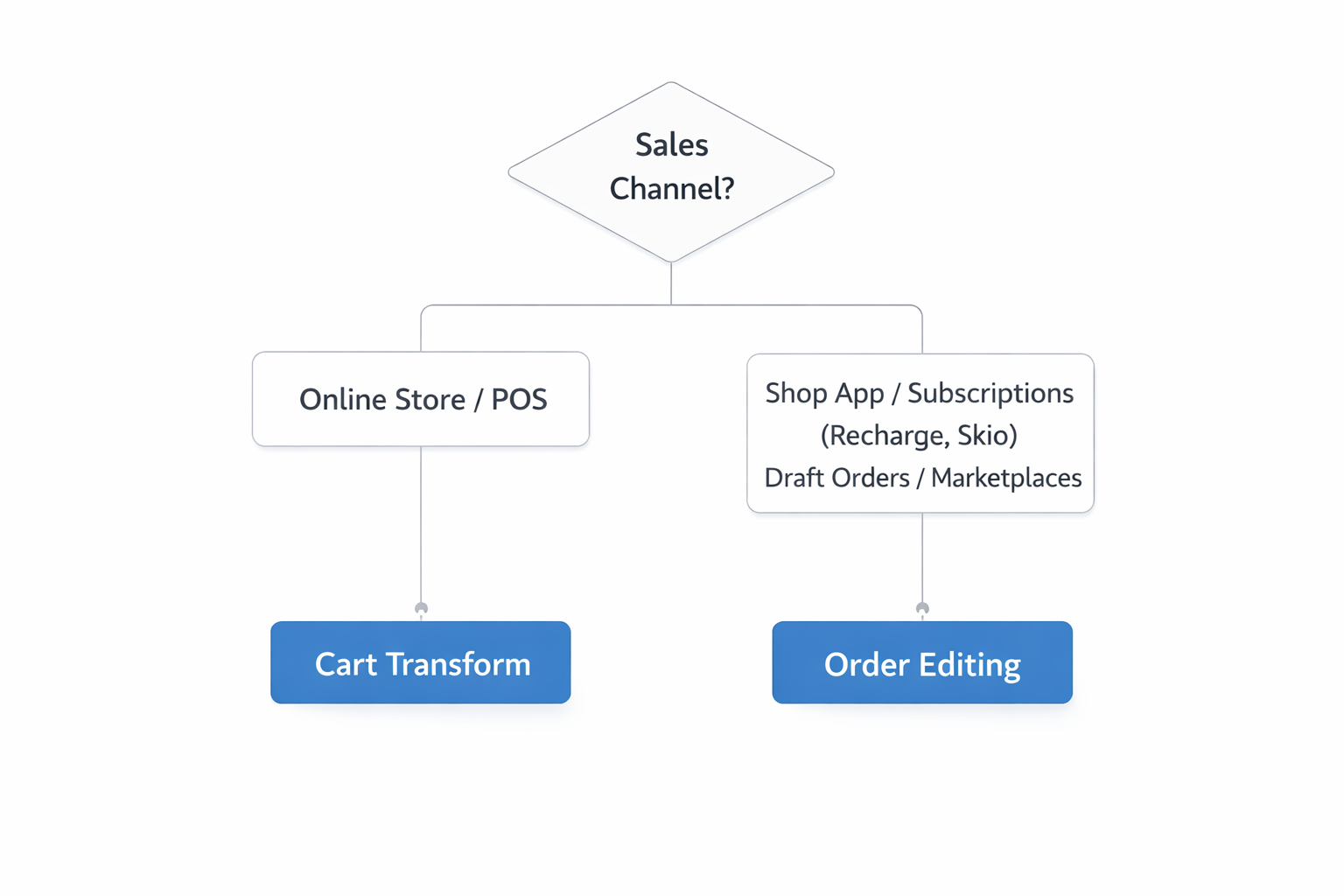
Most merchants fall into one of these two camps. If you're running a straightforward DTC store with just the online checkout, your life is simpler. If you've expanded to subscriptions, marketplaces, or other sales channels, you'll see both methods in action.
Cart Transform is a Shopify Function that breaks down your parent bundle into its child products right at checkout. The customer adds a bundle to their cart, but by the time the order is created, it contains only the individual items.
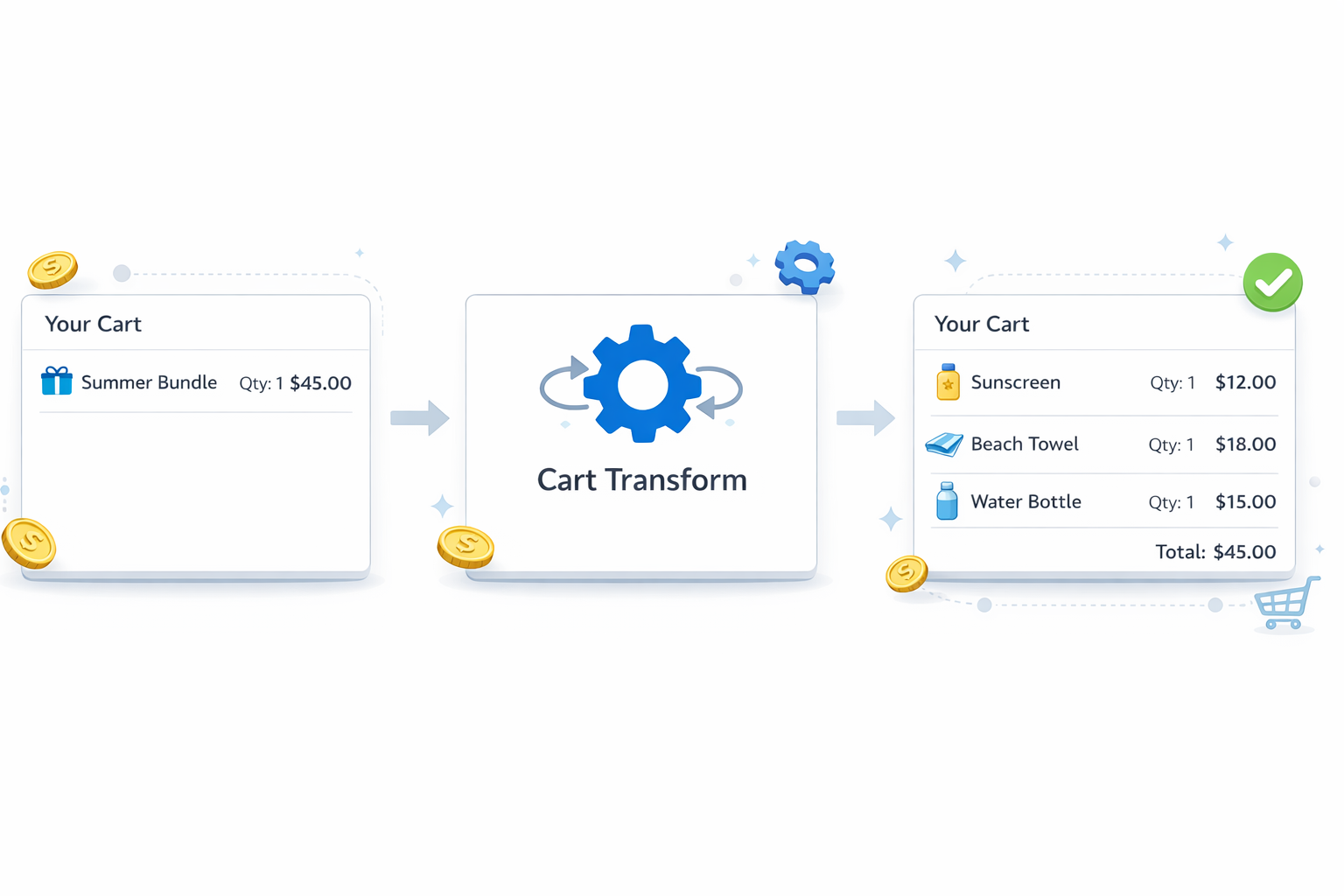
What you'll see in the order:
This happens because Cart Transform transforms the cart contents before the order is finalized. The parent bundle essentially disappears, replaced by its components with the bundle discount spread across each item.
Why it works this way:
Shopify's Cart Transform API is designed to modify cart contents in real time. It's clean, efficient, and means your inventory deducts correctly the moment the order is placed. There's no delay, no post-order processing required.
Where to manage this:
You can access Cart Transform settings in App Settings, then Advanced Settings, then Cart Transform and Order Editing Fallbacks.
This is where it gets more interesting. Cart Transform currently only supports Online Store checkout and Shopify POS. That's a Shopify limitation, not a Simple Bundles one. For orders coming from other channels, Simple Bundles falls back to order editing.
Order editing works differently:
Instead of transforming the cart at checkout, this method adds the child products to the order after it's created. The parent bundle stays visible, and the child items appear alongside it.
What you'll see in the order:
This structure looks different from Cart Transform orders, but the math works out the same. The customer pays the bundle price, and you get accurate inventory tracking for each component.
When order editing can't work:
Some orders can't be edited after creation due to Shopify restrictions. When this happens, Simple Bundles creates an associated order containing the bundle contents instead. This associated order includes a note referencing the original order number so you can connect them during fulfillment.
That's Cart Transform doing its job. When a customer checks out through your online store, the bundle gets broken down into components at checkout. The parent product doesn't make it into the final order because it's been replaced by the items inside it.
This is normal and expected for online store orders in Simple Bundles 2.0.
That's the order editing method handling a non-online-store order. When Cart Transform can't process an order (because it came from Shop app, a subscription platform, or another channel), Simple Bundles adds the child products after the fact while keeping the parent visible.
The 100% discount on child products ensures the customer isn't charged twice. The parent carries the price, the children carry the inventory tracking.
Probably. Shopify is expected to expand Cart Transform API support to additional sales channels over time. When that happens, more of your orders will use Cart Transform and fewer will need order editing. Simple Bundles is built to adapt as Shopify expands these capabilities.
You might wonder why Simple Bundles doesn't just pick one approach and stick with it. The answer comes down to coverage.
Cart Transform is the cleaner solution when it's available. It processes at checkout, requires no post-order modifications, and keeps order structure simple. But it only works where Shopify supports it.
Order editing is the fallback that ensures every order gets processed correctly, regardless of sales channel. It's slightly more complex in terms of order appearance, but it guarantees your bundle contents and inventory are always accurate.
By using both, Simple Bundles covers every scenario. You don't have to think about which method to use. The system detects the order source and applies the right approach automatically.
For fulfillment, both methods give you what you need: a clear list of which products to pick and pack. The visual difference in order structure doesn't change what you're shipping.
For inventory, both methods track correctly. Cart Transform deducts inventory at checkout, order editing deducts when the child products are added. Either way, your stock levels stay accurate.
For reporting, you may notice some variance in how orders appear in Shopify's native reports depending on which method processed them. If you're running detailed bundle analytics, knowing which orders used which method can help explain any inconsistencies.
If your orders sometimes show only child products and sometimes show both parent and children, now you know why. It's not random. It's Simple Bundles adapting to how each order was created.
For most merchants selling only through their online store, Cart Transform handles everything and orders will consistently show just the child products. If you're selling across multiple channels, you'll see both patterns, and that's exactly how it should work.
Head to App Settings, then Advanced Settings, then Cart Transform and Order Editing Fallbacks to confirm which methods are currently enabled for your store.
From there, you can see whether Cart Transform is active, check your order editing fallback status, and adjust settings if your sales channels have changed. When reviewing a specific order that looks unexpected, check the sales channel in Shopify's order details. That tells you exactly which method processed it.
See how brands are using Father’s Day product bundles to make gifting easier and drive larger carts.
Product bundle pricing is one of the most effective ways to increase average order value. This guide explores the psychology and economics behind successful bundling, including why bundles increase perceived value, how top brands structure their offers, and the pricing frameworks that drive results.
This guide breaks down how Shopify POS bundles actually work, the limitations of native bundling, and how growing brands create flexible bundle experiences with real-time inventory syncing and smooth in-store checkout flows.

