


The 5 Best Shopify Dropshipping Apps to Use in 2026
Modern dropshipping apps have evolved far beyond simple product imports.
Basil Khan
Jan 19, 2026 · 4 min
The bundle relationships exist. Now your external systems can finally see them.

Basil Khan
Jan 19, 2026 · 4 min
Basil is the Co-Founder and CTO of Simple Bundles, where he leads product strategy and development. With deep experience building scalable systems for merchants, he specializes in the technical and operational challenges for back-office operations.
Your analytics dashboard shows orders coming in. Revenue looks good. But when you try to understand which bundles are actually driving that revenue? You're staring at line items that tell you almost nothing.
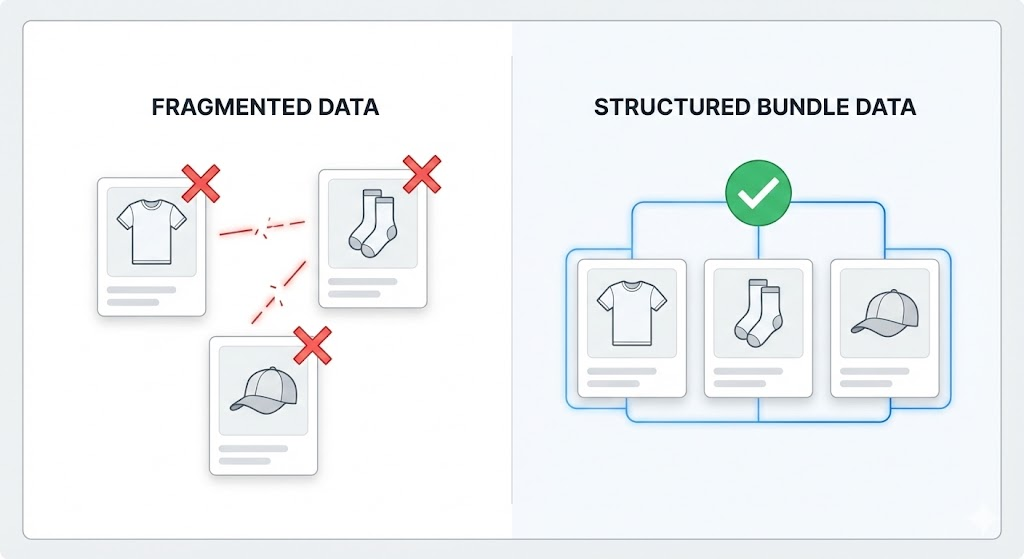
That's because Shopify treats bundle components as individual line items. Your external systems see "Blue T-Shirt, Size M" and "White Socks, 3-Pack" as separate purchases. They have no idea these items were sold together as the "Summer Basics Bundle" at a 15% discount.
That missing context makes your data incomplete. And incomplete data leads to messy processes and bad decisions.
Shopify wasn't built with bundles in mind. When a customer buys a bundle, the order record captures the individual products, quantities, and prices. What it doesn't capture is the relationship between those items.
This creates problems the moment you try to move order data anywhere else:
The data exists in Simple Bundles. The challenge is getting it into a format your other systems can use.
Want bundle analytics without building custom integrations? Our partners at Report Toaster offer pre-built bundle reports that pull directly from Simple Bundles data. You get bundle sales over time, top-selling bundles, and customer segmentation without writing a single line of code. Simple Bundles customers get 20% off—just mention us when you sign up.
Simple Bundles can write bundle details directly to Shopify order metafields. This creates a structured JSON record attached to each order that contains everything your external systems need.
The metafield data includes:
This is structured data in JSON format. That matters because JSON is the universal language for system integrations. Your analytics platform, inventory management or ERP, or custom webhook endpoint can parse it directly.
Here's what makes metafields different from other approaches: they contain the complete picture. Custom line item attributes can store some bundle info, but metafields give you pricing breakdowns, variant relationships, and bundle groupings all in one place.
Getting this set up takes about 30 seconds:
That's it. From now on, every order containing bundles will have metafield data attached automatically.
One thing to note: this feature requires an Advanced or Plus plan. If you're on a lower tier, the toggle will appear grayed out.
Having metafield data attached to orders is step one. Step two is actually sending that data where you need it.
Shopify Flow is the most straightforward way to push bundle data to external endpoints. Here's a workflow that works:
Trigger: Order created
Condition: Order contains bundles (optional, but saves unnecessary API calls)
Action sequence:
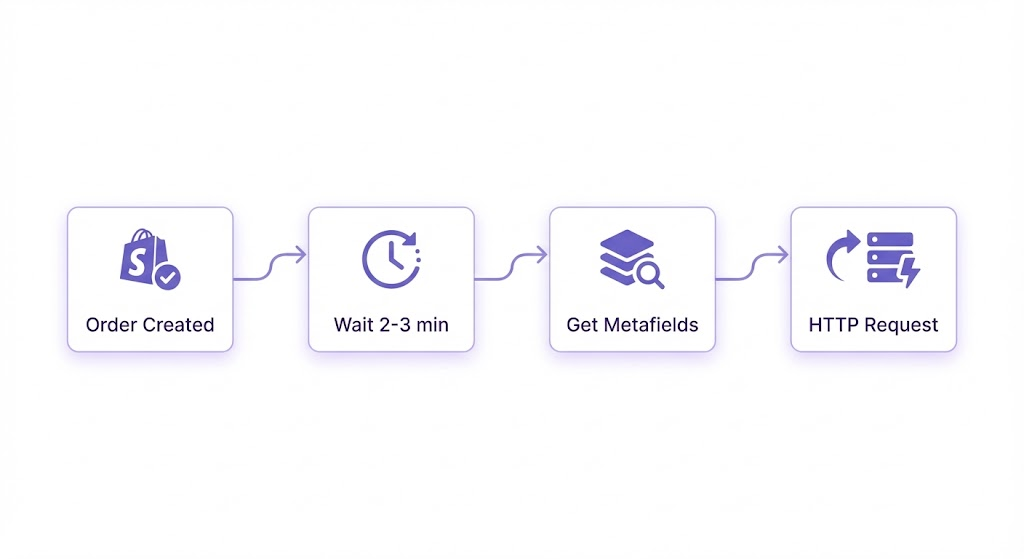
The HTTP request can point to any endpoint that accepts JSON: your analytics platform's API, an ERP webhook, a Zapier catch hook, or a custom server you control.
When you fetch the metafields, you'll get a JSON structure that includes array-based groupings. Each bundle in the order appears as its own object with all the component details nested inside.
This structure means you can:
Flow isn't the only path. Depending on your tech stack, you might also consider:
/metafields.json to any Shopify order URL to retrieve the dataThe Flow approach works well for most merchants because it requires no code and runs entirely within the Shopify ecosystem.
You might be wondering whether metafields are actually better than the alternatives. Here's how to think about it.
Use metafields when:
Consider custom line item attributes when:
For most merchants building serious integrations, metafields are the better choice. The data is richer, the format is more flexible, and you're not limited by line item property constraints.
If you're already on an Advanced or Plus plan, turn on the metafield toggle today. It takes seconds, and you'll immediately start building a data history you can use later.
If you're not sure what system to send data to yet, that's fine. Enable metafields anyway. The data will accumulate on your orders, and you can build integrations when you're ready.
For most merchants, the Shopify Flow approach is the fastest path to value. Set up the workflow once, and every bundle order automatically pushes data to your endpoint.
The bundle relationships exist. Now your external systems can finally see them.
Modern dropshipping apps have evolved far beyond simple product imports.
There are dozens of touchpoints across the customer journey where an upgrade is natural and welcome.
Instead of one bundle-wide price or percentage discount, every product can have its own adjusted price.

