









How to increase AOV without discount addiction on Shopify
Learn how Shopify brands increase AOV without relying on constant discounts using bundles, upsells, free shipping thresholds, and smarter merchandising.

Tina Donati
Jul 28, 2025 · 6 min
Learn how to create print-on-demand product bundles on Shopify without inventory issues, split shipments, or fulfillment errors. Includes Printful, Printify, and Shopify bundle tips.

Tina Donati
Jul 28, 2025 · 6 min
Tina Donati is the Head of Marketing at Simple Bundles and has spent the past 7+ years helping Shopify brands streamline their tech stack and unlock growth through smarter product bundling, better UX, and cleaner ops.
Most print-on-demand stores sell one product at a time.
But the highest-performing POD brands use bundles to:
The problem? Bundling print-on-demand products on Shopify gets complicated fast.
Between Shopify variant limits, split shipments, Printful syncing issues, and fulfillment logic, many POD bundles quietly create operational chaos behind the scenes.
This guide breaks down exactly how to create print-on-demand product bundles that increase sales without breaking your backend.
Before you even think about bundling, make sure each product you want to include is already synced with your POD provider (like Printful, Printify, Gelato, or Gooten) and set up properly in Shopify.
For example, if you create a bundle that includes a new t-shirt design and a piece of wall art, but you haven’t added the t-shirt to Shopify yet and connected it to Printful — your customer can check out, but your POD provider won’t know what to produce.
Here’s your sync checklist:
Take the time to set up each SKU properly, upload the mockups, assign the right fulfillment location, and verify it syncs in your POD admin dashboard before creating the bundle.
The complexity of your bundle determines how you should set it up in Shopify and your bundling app. For example, in Simple Bundles, we see the three following types of bundles for print on demand products:
Simple bundle without variants — if you want to sell a fixed set — say, a medium ash t-shirt and a large heather sock — with no choices for the customer. This is the most straightforward and easiest to manage because the customer just clicks ‘Add to Cart,’ and the system knows exactly which SKUs to fulfill.
Simple bundle with variants — if you want customers to choose from a few preset options, like size or color — as long as you stay within Shopify’s 3-option, 100-variant limit. This keeps things manageable but gives customers a bit more flexibility.
Infinite options bundle — if you want to offer lots of choices — like multiple colors, sizes, or designs — and you exceed Shopify’s limits. Here, a tool like Simple Bundles handles the variant logic outside of Shopify so you can offer more without breaking your store or your backend.
If you want help setting up any of these types on Printful, we actually have a video tutorial right here to make it easy:
POD products are made-to-order, so you don’t need Shopify to track inventory for the bundle itself, especially because the main SKU for the bundle isn’t going to track the individual items that make up that bundle out of the box.
In fact, leaving inventory tracking on can cause Shopify to block sales because it thinks you’re out of stock — even though your POD provider can fulfill unlimited orders.
Instead, disable inventory tracking for the bundle in Shopify, and let your POD partner manage stock levels for the blank products they print on.
Also, Simple Bundles breaks down bundles in the order admin. Even though fulfillment is done from the POD service, it's still worthwhile to breakdown bundles into individual components (so tracking at the child SKU level versus the parent SKU for the bundle as a whole) because you can get a feel of which bundle and items are selling well.
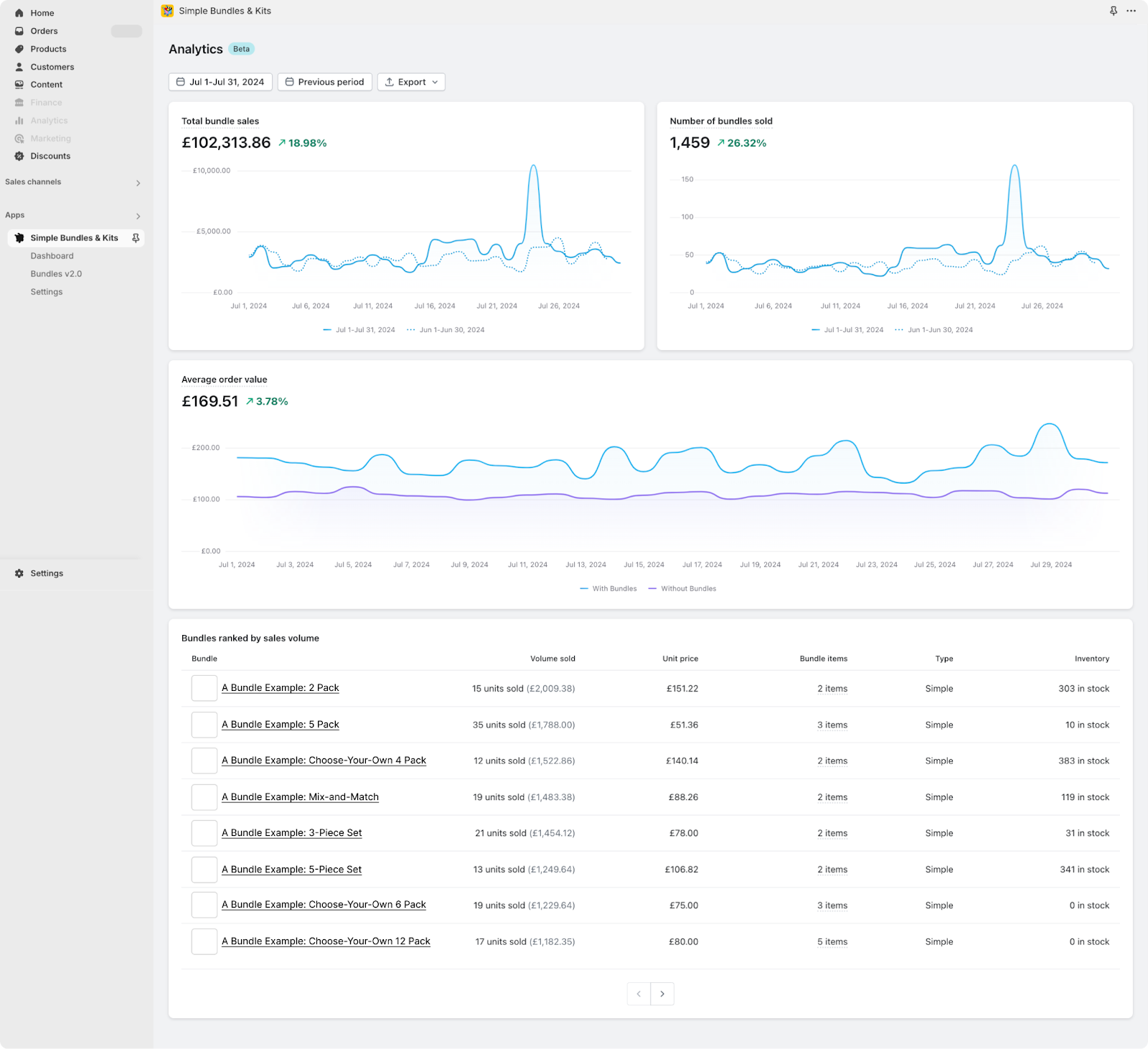
Two reports from Shopify which makes bundle performance tracking even easier:
Also, watch out for split shipments.
Remember, POD products can have different production and shipping times, especially if they’re made in different facilities.
If you bundle items with very different timelines, the customer may get part of their order first and wonder where the rest is. Set clear expectations at checkout and in your confirmation email:
‘Some items in your bundle may ship separately at no additional cost.’
This small touch builds trust and cuts down on support tickets.
Because POD business models typically have higher base costs, you need to be strategic with price. Heavy discounts on bundles can eat into your margins quickly.
Instead of deep discounts, try these alternatives:
This way, customers see value without you sacrificing profitability. Think of it as elevating your e-commerce business strategy rather than competing in a bargain bin.
Bundles aren’t just useful in Shopify. Many print-on-demand businesses sell across multiple platforms — like Etsy, Amazon, and TikTok Shop.
Offering new products in bundled sets on these marketplaces can help you stand out in competitive categories like custom products, t-shirts, hoodies, and wall art.
Your online store should also highlight bundles on social media platforms like TikTok or Instagram, showing customers how your products fit together in real-life use cases. Video content showcasing bundled print on demand products in lifestyle settings is one of the fastest ways to build trust and boost sales.
Hopefully these four tips were helpful. Because, look, when you set up your bundles with care, you create a smooth experience for your customers, your backend systems, and your bottom line.
The Printful team also has a video tutorial to walk you through these steps in detail here:
And if you want to try it for yourself, you can get started on Simple Bundles for free here.
Yes — just make sure each item is synced to Shopify first. Then use a bundle app (like Simple Bundles) to create the bundle logic.
No. Turn off inventory tracking for the bundle in Shopify. Let your POD provider manage inventory on the actual print files.
Use an infinite options bundle. Simple Bundles lets you manage variant logic outside of Shopify’s limits, so you can offer as many options as you want.
Simple Bundles is built specifically to work with made-to-order products. It breaks down your bundle SKU into individual components for clean fulfillment.
Not always. They may ship separately depending on the print location or provider. Be sure to communicate this to your customers at checkout.
Yes. Printify products can be bundled together on Shopify using a bundling app that supports SKU-level order breakdowns and POD fulfillment workflows.
Print-on-demand stores use bundles to:
Bundles also help introduce customers to more products in your catalog.
Usually no. Most POD merchants disable inventory tracking for the parent bundle product because the actual inventory is managed by the print-on-demand provider. This prevents Shopify from incorrectly marking bundles as out of stock.
The best Shopify bundle apps for POD stores support:
Simple Bundles supports these areas, helping prevent operational issues as your store scales.
Learn how Shopify brands increase AOV without relying on constant discounts using bundles, upsells, free shipping thresholds, and smarter merchandising.
This guide covers 10 important questions every brand should ask before signing with an agency. From understanding their experience with Shopify and CRO to evaluating reporting, retention strategies, paid media expertise, and communication processes.
This guide explains how to create free gift with purchase promotions on Shopify using native discounts, bundle apps, and automation tools. Learn how to add gifts automatically, boost AOV with cart upsells, and create a smoother customer experience.

