Basil is the Co-Founder and CTO of Simple Bundles, where he leads product strategy and development. With deep experience building scalable systems for merchants, he specializes in the technical and operational challenges for back-office operations.
bundle strategy
A better way to sell bundles on Shopify POS
This guide breaks down how Shopify POS bundles actually work, the limitations of native bundling, and how growing brands create flexible bundle experiences with real-time inventory syncing and smooth in-store checkout flows.
Basil is the Co-Founder and CTO of Simple Bundles, where he leads product strategy and development. With deep experience building scalable systems for merchants, he specializes in the technical and operational challenges for back-office operations.
We get this question all the time: Can you sell product bundles on Shopify POS?
The quick answer? Yes, you can sell product bundles on Shopify POS. But how well it works depends entirely on your setup.
The reality is Shopify does support bundles on POS as a sales channel. You can publish bundles, add them to cart, and process transactions. But native functionality is limited, and many setups don't properly handle inventory deductions or bundle logic at checkout.
With the right app, you can sell bundles in-store, let customers customize their selections at checkout, and sync inventory across POS and online in real time.
Why selling bundles on POS matters
Your customers don't think in channels. They expect the same offers whether they're browsing your website at midnight or walking into your store on Saturday afternoon.
When bundles only work online, you're essentially running two different businesses. Your website offers a "Build Your Own Gift Set" experience while your retail staff has to explain why that same deal isn't available in-store.
The operational headache goes deeper than customer confusion. Without proper POS bundle support, you're managing separate pricing systems, separate inventory counts, and separate promotional calendars. That's a recipe for overselling, margin erosion, and frustrated staff.
Bundles also drive higher average order values. A customer who came in for one candle might leave with a three-pack when presented at checkout. But only if your POS can actually handle that transaction correctly.
The Challenge of in-person product bundling
In a perfect world, scanning a pre-packaged gift box would instantly deduct one candle, one matchbook, and one tray from your inventory.
In reality, many retailers struggle with "ghost inventory."
If you sell a bundle as a single SKU without the right setup, your system won't know the individual items are gone. This leads to overselling online and a massive headache for your warehouse team during end-of-month counts.
Shopify’s native bundling features have improved, but they often struggle with the complexity of POS transactions. Standard bundles created in the Shopify admin don't always communicate well with the barcode scanner or the localized inventory of a physical brick-and-mortar branch.
To ensure that your staff doesn’t have to manually adjust stock levels every time a customer buys a curated kit, you need an external app or plugin designed specifically for POS compatibility.
Basic fixed bundles appear in your POS product catalog with a fixed price
You can add them to cart like any other product
Simple multipacks process without issues
What doesn't work well:
Variant options are limited (capped selections)
No advanced customization at checkout
Inventory syncing is unreliable, especially with multi-location setups
Dynamic or build-your-own experiences aren't supported
Native bundles are fine if you're selling straightforward multipacks. A "3-pack of socks" where every customer gets the exact same thing. But the moment you need flexibility, you'll hit walls.
Using a third-party bundling app
This is where most growing brands need to move. There are tons of apps available in the Shopify app store. However, they aren’t all compatible with Shopify’s pos channel. When looking into a third-party app to support you, check for this first.
We can speak to the experience of Simple Bundles’ POS integration, since we’re experts on this app.
The key difference is how bundles behave at checkout. More on that in a moment.
How bundles actually work on Shopify POS
This is the section most guides skip, and it's the most important thing to understand.
If you prefer to watch a video, here's one our team put together:
When a customer buys a bundle on POS, here's what should happen:
Step 1: Add the bundle to cart. Staff selects the bundle product from the POS catalog or uses the Simple Bundles tile for customizable options.
Step 2: Configure the bundle (if needed). For infinite options bundles, staff selects variants, sizes, colors, or whatever options the customer wants. The Simple Bundles POS extension provides this interface.
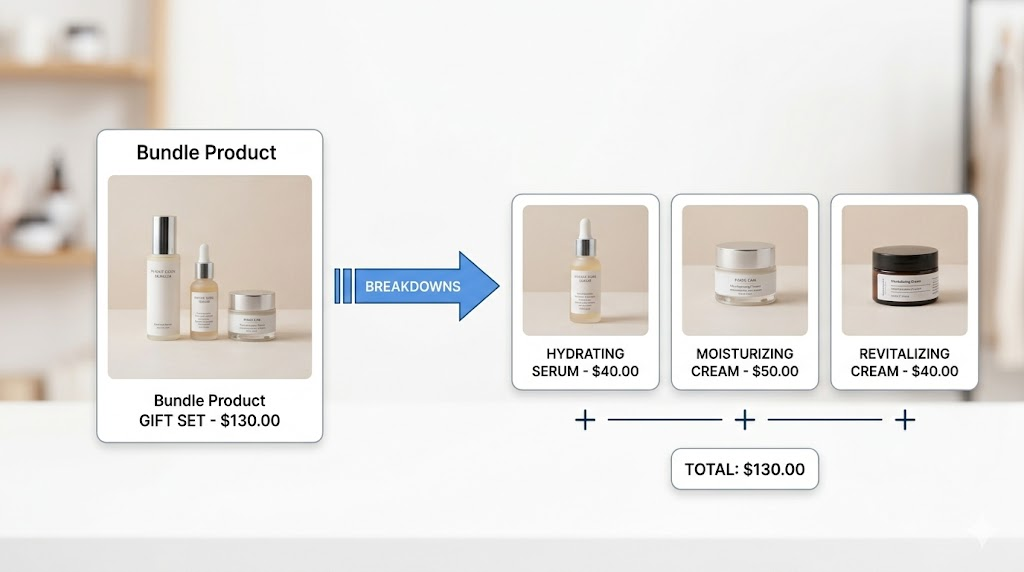
Step 3: The bundle breaks into components at checkout. This is the critical part. Bundles must "split into line items" at checkout, meaning the point of sale breaks the bundle into individual SKUs.
Why does this matter? Because splitting ensures:
Correct inventory deduction for each component
Accurate fulfillment when orders include both bundled and individual items
Proper reporting on which products actually sold
Bundles split into individual line items at checkout for accurate inventory and fulfillment.
As of August 2025, Shopify POS supports "split line-items for dynamic bundles," which itemizes individual components while maintaining the bundle logic. This is what makes reliable bundle selling possible.
Without this splitting behavior, you end up with phantom inventory issues. The system thinks you sold one "bundle" but doesn't know that bundle contained three different products that need to be deducted from stock.
How to set up bundles on Shopify POS
The setup process differs based on your bundle type.
For simple bundle types (fixed bundles)
These work without any additional POS configuration. Staff can select variants directly, and bundle SKUs automatically break down at checkout. Just publish the bundle to your POS sales channel and you're ready to sell.
For infinite options bundles
These require the Simple Bundles POS extension. Here's how to set it up:
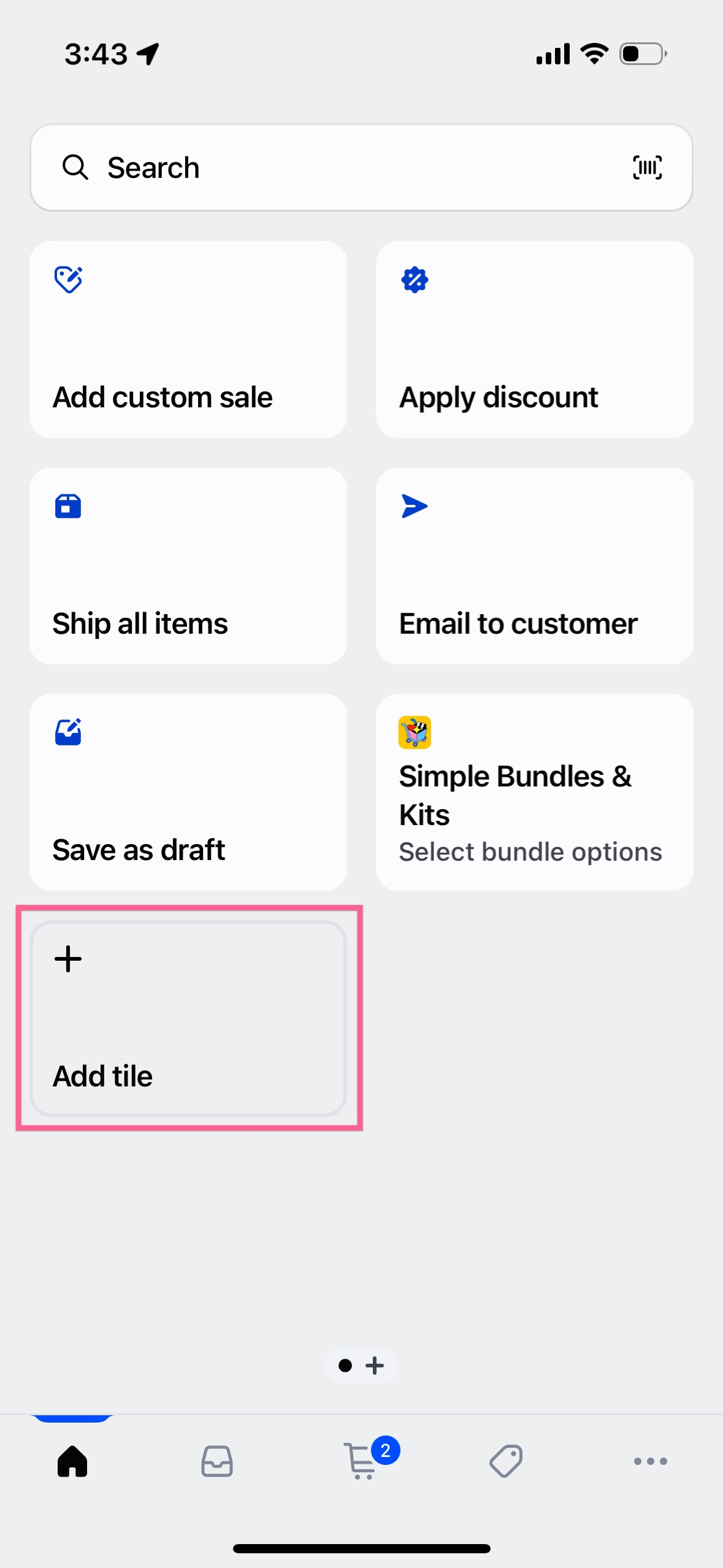
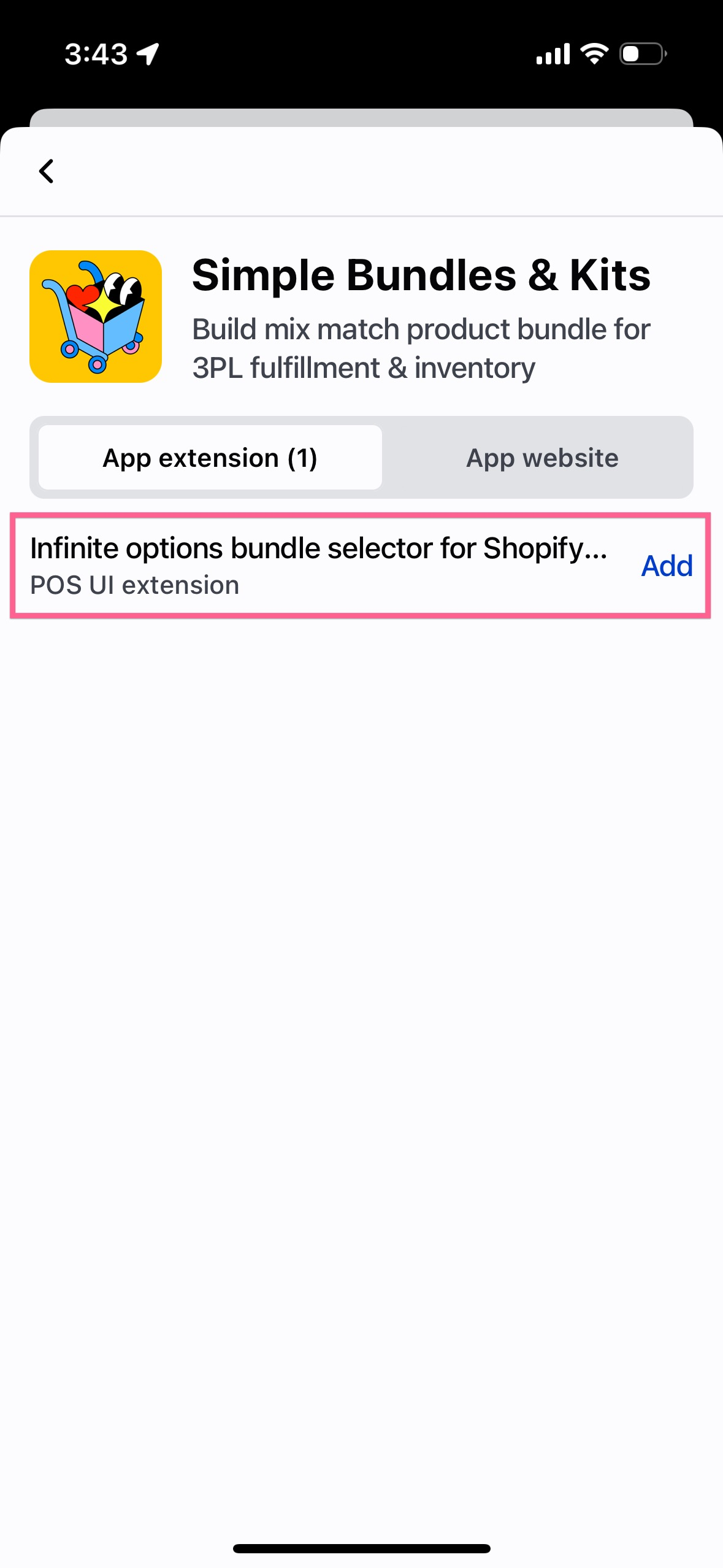
1. Add the Simple Bundles tile to POS. Navigate to your Shopify POS home, select "Add tile," click "Simple Bundles" on the Add app page, choose "Infinite Options bundle selector for Shopify," and click "Add."
2. Enable cart line item access. Go to POS settings in your store, select the "Infinite options bundle selector for Shopify POS" app, and add it for "Additional areas/Cart line item details." This lets staff edit bundle configurations directly from cart items.
3. Configure staff permissions. In Shopify Admin, go to Settings, then Users and permissions. Click each staff member's name, enable "Manage and install apps and channels," and make sure "Simple Bundles" is checked.
A few technical notes: The POS app extension is available on paid Simple Bundles plans. You'll want iOS 15.1 or later (or the latest Android version) for best compatibility.
What types of bundles work on POS?
Works well:
Fixed bundles and multipacks (native or app-based)
Mix-and-match bundles with Simple Bundles
Build-your-own bundles with the POS extension
Curated bundles with pre-selected components
Doesn't work well natively:
Complex variant bundles with multiple selection points
One limitation to know: Simple Bundles 2.0 cannot process infinite options bundles when sales attribution is enabled in POS. If you're using sales attribution to track staff performance, you'll need to either disable it or manually remove attribution before checkout for bundle transactions.
Bundles on Shopify POS isn't hard
The real challenge is making the workflow correct across inventory, checkout, and fulfillment.
Anyone can create a bundle product and add it to POS. But if that bundle doesn't properly deduct inventory, doesn't break into fulfillable line items, and doesn't sync with your online store, you're setting yourself up for operational chaos.
The merchants who succeed with omnichannel bundles are the ones who think through the entire flow. What happens when this bundle sells? Where does inventory get deducted? How does the warehouse know what to pick? How do returns work?
Get the backend logic right, and selling bundles on POS just works. Skip that work, and you'll spend more time fixing problems than selling products.
The article walks through a four-step setup framework, including SKU mapping, automatic inventory syncing, and order testing, while also sharing conversion best practices to help three-pack bundles increase AOV and drive more sales.
In this guide, we’ll share 15 product bundling tips, real ecommerce examples, and Shopify-specific strategies to help you create bundles customers actually want to buy.
Learn how Shopify brands increase AOV without relying on constant discounts using bundles, upsells, free shipping thresholds, and smarter merchandising.