









How to increase AOV without discount addiction on Shopify
Learn how Shopify brands increase AOV without relying on constant discounts using bundles, upsells, free shipping thresholds, and smarter merchandising.

Tina Donati
Jan 26, 2026 · 11 min
Choosing the wrong Shopify bundle app can cause overselling, fulfillment issues, and broken inventory syncing. Learn which bundle app features actually matter before you scale.

Tina Donati
Jan 26, 2026 · 11 min
Tina Donati is the Head of Marketing at Simple Bundles and has spent the past 7+ years helping Shopify brands streamline their tech stack and unlock growth through smarter product bundling, better UX, and cleaner ops.
Choosing the wrong Shopify bundle app usually doesn’t fail immediately.
At first, bundles seem simple: group products together, increase average order value, and improve conversion rates.
But once orders start scaling, weak bundle architecture creates operational problems fast:
That’s why the best Shopify bundle apps aren’t just storefront tools, they’re inventory, fulfillment, and data infrastructure.
In this guide, we’ll break down the most important Shopify bundle app features to look for before you install one, including inventory mapping, mix-and-match logic, analytics visibility, returns workflows, and fulfillment-safe bundle architecture.
Before we get to the features, we thought it’d be helpful to explain why you need to preserve “bundle relationships.”
We also cover these challenges in this video:
The summary?
Shopify records orders as line items. If a customer buys a bundle that contains a “Blue T-Shirt (M)” and a “White Socks 3-Pack,” Shopify is perfectly happy recording those as two separate line items.
What Shopify does not naturally preserve is the relationship between those items: that they were sold together as “Summer Basics Bundle” at a specific bundle discount, with a specific bundle configuration chosen by the shopper.
That missing relationship becomes painfully obvious as soon as you try to do anything downstream:
A bundle builder that only focuses on the storefront experience is solving the easiest part, so you don’t want to choose an app solely for the frontend experience.
A lot of bundle apps look similar on the surface.
But the real differences usually don’t show up until the operational complexity starts.
That’s why it helps to evaluate bundle builders less like merchandising tools… and more like infrastructure decisions.
Here are a few questions worth asking before you commit:
This is one of the biggest dividing lines between lightweight bundle widgets and operationally mature bundle systems.
Once an order leaves the storefront, can your systems still understand:
Or does everything collapse into disconnected SKU sales?
Not just “supports variants.”
Can it map the exact component SKUs inside the bundle and deduct the correct inventory automatically?
Without clear SKU-level mapping, overselling tends to appear gradually:
This is one of the easiest things to overlook during app evaluation because most demos focus entirely on bundle creation.
But real commerce involves constant corrections:
Some bundle setups become surprisingly fragile once an order is placed. Even small edits can break pricing logic or require support teams to cancel and recreate the order entirely.
If the bundle app creates ambiguous orders, fulfillment teams are left guessing:
A strong bundle builder should make fulfillment easier to interpret, not harder.
Many merchants install a bundle app for one simple use case:
But bundle strategy tends to evolve quickly. So ask yourself, “Will this still work once we start experimenting more aggressively?”
Look, we’ve seen the issues first-hand, and we’ve read about them across Reddit threads and Shopify Community Posts.
The same issues come up over and over. So, here’s the features to look for if you want to avoid picking an app that you end up migrating off of later:
If there’s one feature that separates “looks good” bundle apps from “safe at scale” bundle apps, it’s whether the app can map bundles to specific variant SKUs.
Merchants commonly assume that if a bundle UI lets a shopper choose “Small / Medium / Large,” the backend will deduct the correct SKU. That assumption is what causes overselling.
A bundle builder must produce a clear BOM (bill of materials) that maps:
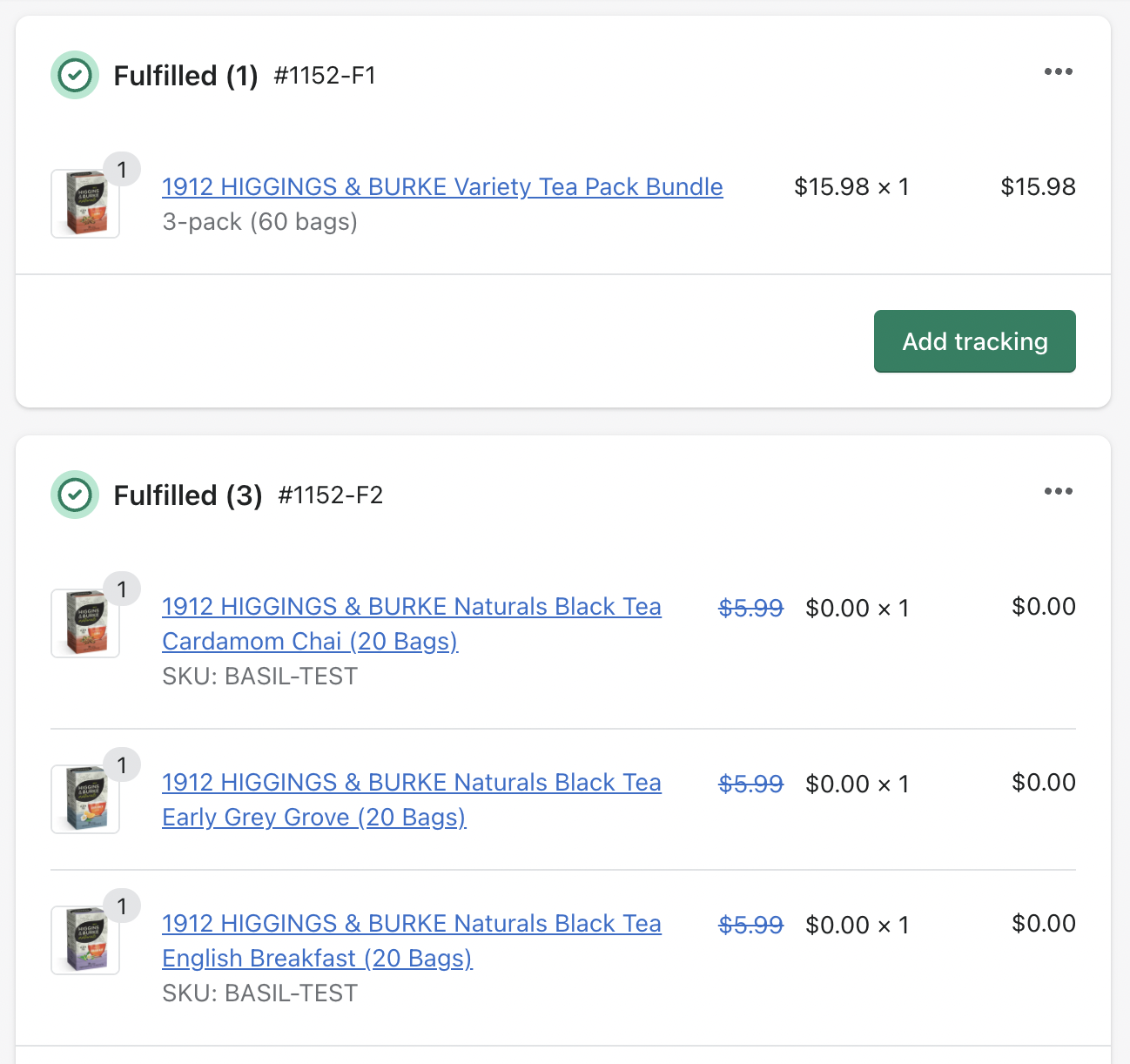
Without this, warehouses and 3PLs are forced to guess. That’s when you see:
How to test it before you commit: Create a bundle with a variant product → place a test order → check Shopify inventory for the specific variant SKU.
One of the most common complaints about bundle apps is that inventory “feels separate” or becomes hard to reason about.
Even when deductions technically happen, merchants often experience the system as opaque—especially once you introduce multiple locations, shared components, or support interventions.
A good bundle builder should make inventory behavior easy to predict:
When this is missing, teams start adding manual buffers, disabling bundles during promo periods, or relying on customer support to “clean up” the mess after oversells. Those are symptoms of a bundle system that isn’t truly inventory-safe.
Many bundle apps rely on rigid widgets and fixed layouts that are difficult to adapt to your brand or theme. They work at first, but over time become fragile as themes evolve, cart drawers change, or mobile layouts break.
What to look for instead:
This is where metafields become especially important.
Some builders like Simple Bundles expose bundle structure and configuration through Shopify metafields. That allows themes or custom front ends to read bundle data directly and render it however the brand chooses.
For example, when bundle composition, pricing breakdowns, or configuration rules are available as metafield data, a developer can:
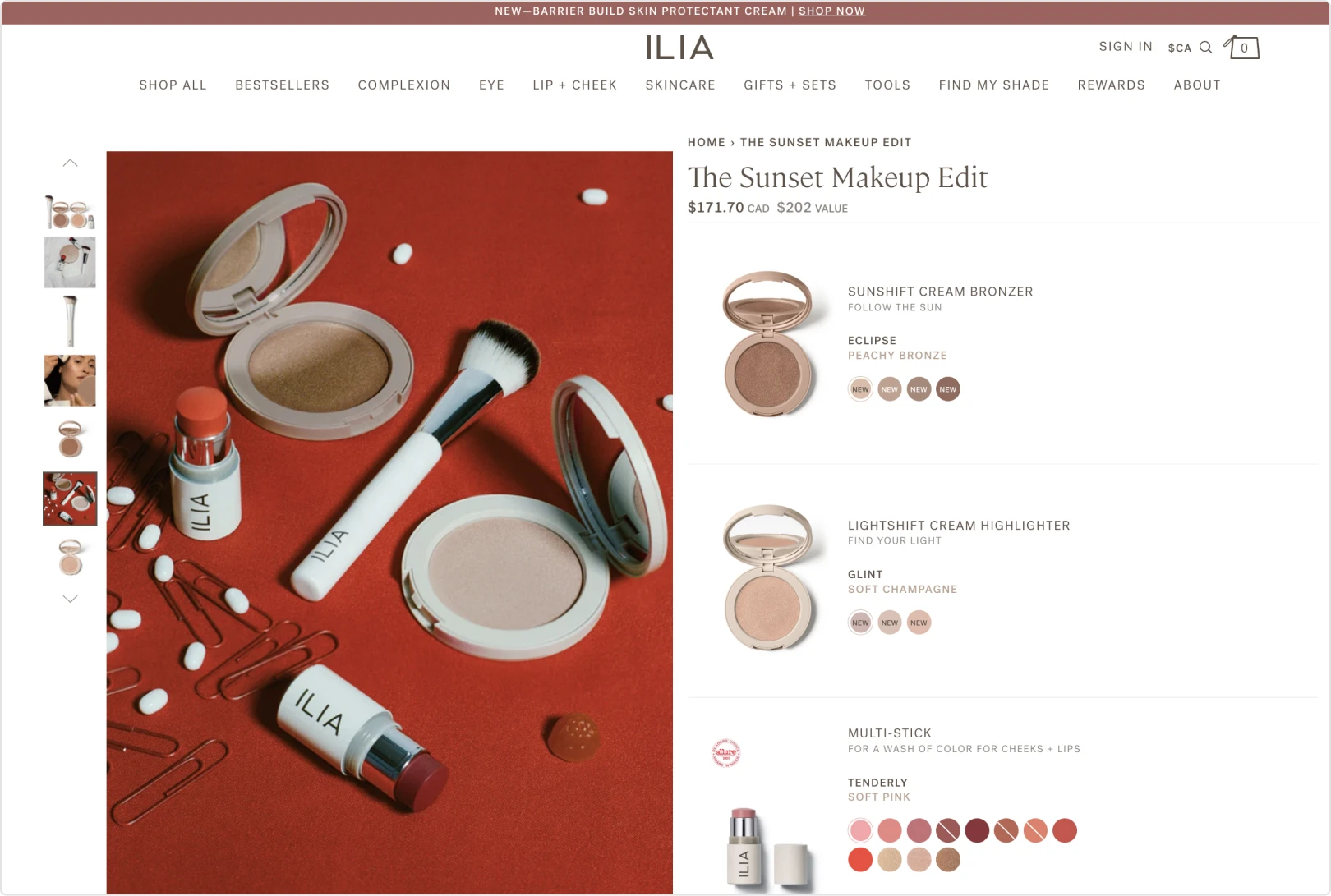
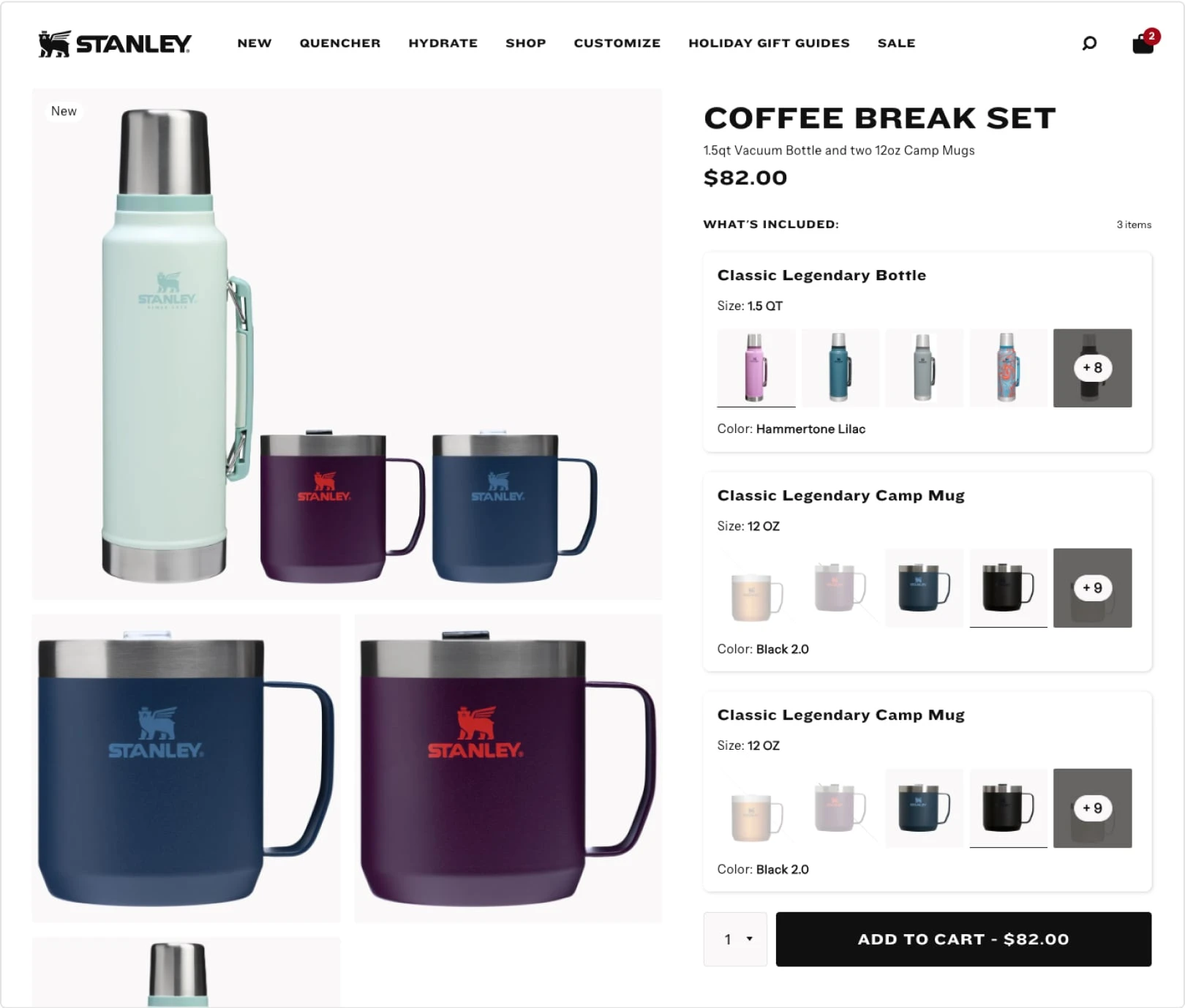
Here’s an example from a few of our customers:
Ilia Beauty:
Stanley:
Loop Earplugs:
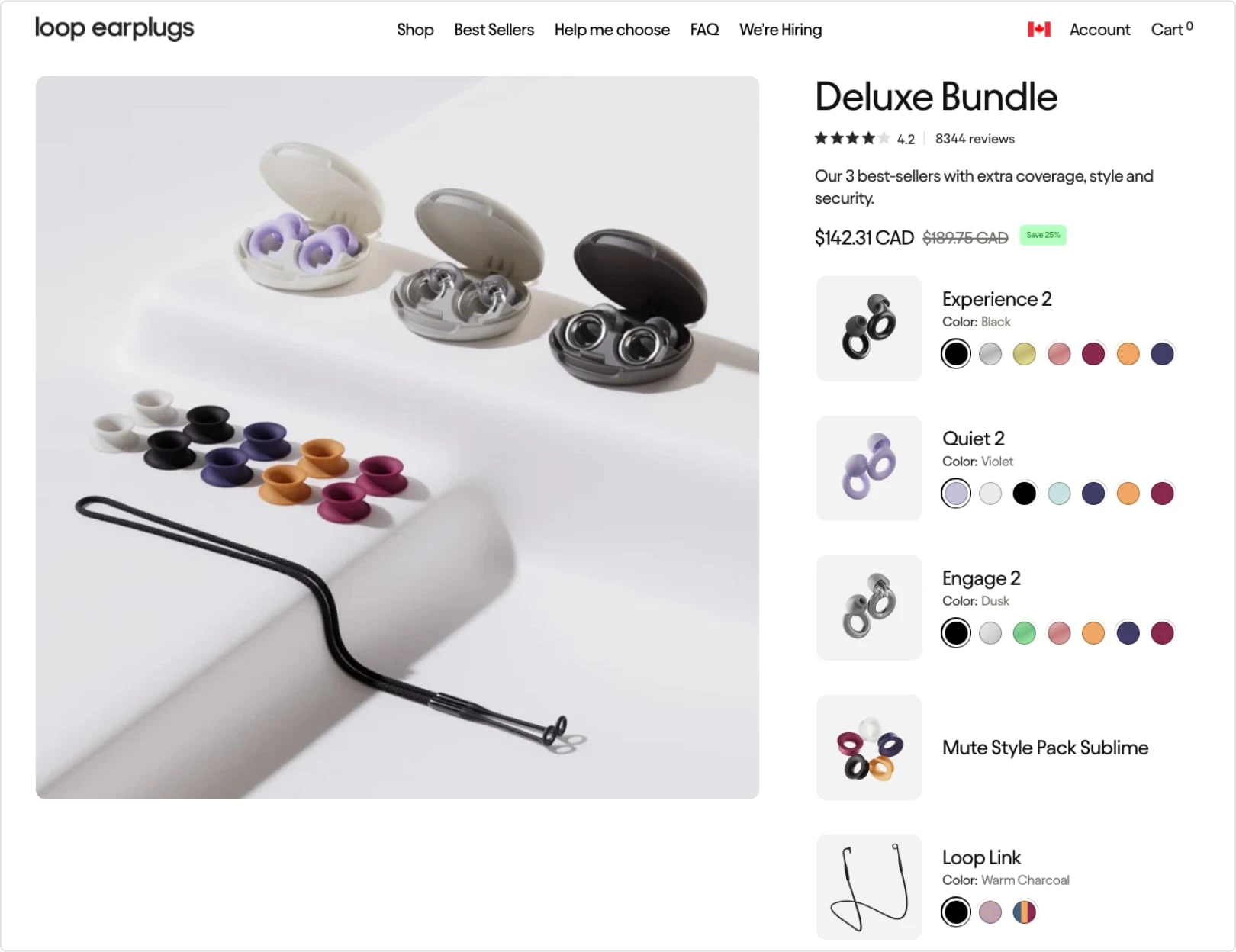
You can see how each of these feel completely on-brand to the rest of the store’s experience.
The more a bundle builder treats front-end customization as a data problem (expose clean, structured bundle data) rather than a widget problem (lock everything into a predefined UI), the more future-proof it becomes.
Real commerce is messy. Customers choose the wrong option. Support needs to swap a component. Ops needs to correct an order before it ships. Returns require adjustments.
Merchants often discover too late that their bundle setup is rigid:
A bundle builder doesn’t need to solve every support workflow for you, but it should avoid making order correction impossible. If your bundles create operational dead ends, your support load rises and your team becomes afraid to push bundling harder.
Build-your-own bundle experiences can convert extremely well—when they feel smooth. But they can also fall apart in one of the most frustrating ways: the “everything is sold out” error that gives no clue what the shopper did wrong.
A common scenario looks like this:
A customer is building a gift box. They choose “Limoncello Macaron” in a quantity higher than available inventory (11 chosen, 10 in stock). Instead of saying “Limoncello has only 10 left,” the builder marks the entire bundle as “sold out.” The shopper has no idea which selection broke the bundle, and the experience feels buggy.
A good bundle builder should:
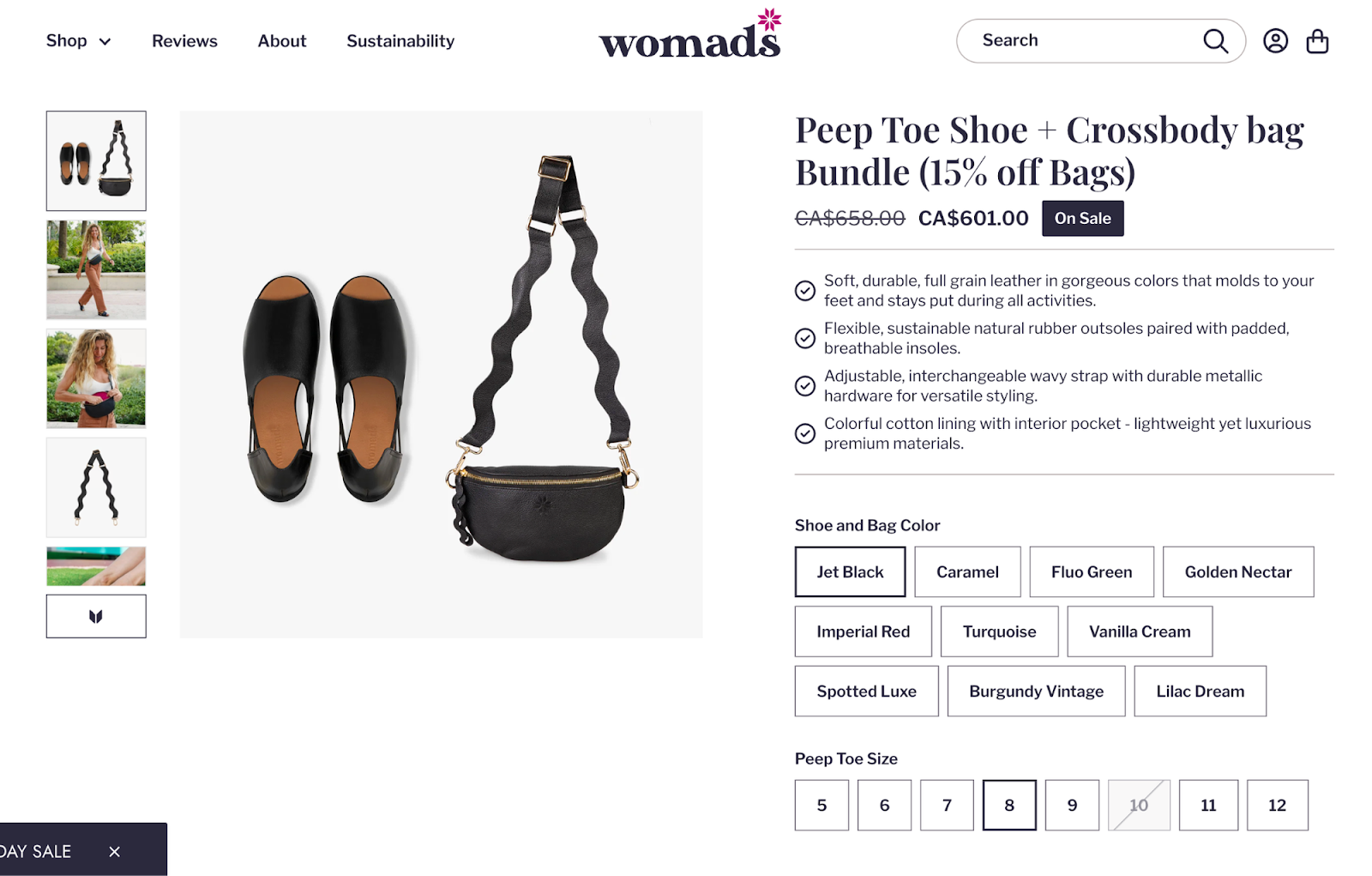
For example, you can see how this works with Womads, a sustainable shoe and bag brand. For this bundle, the size 5 shoes are out of stock for the colors “Spotted Luxe”, “Burgundy Vintage” and “Lilac Dream,” which marks the entire bundle out of stock to purchase.
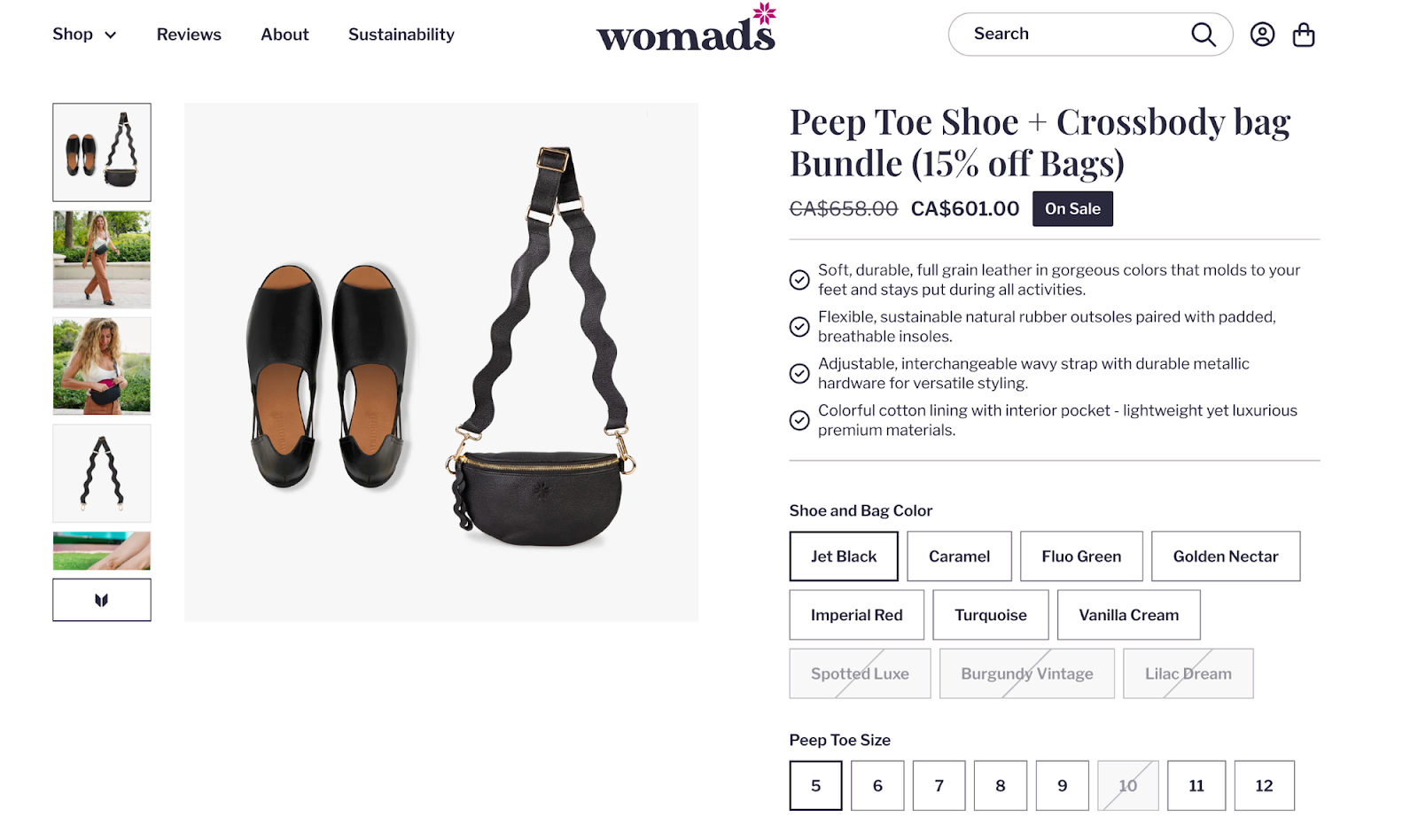
But as soon as you change the shoe size to 8, these colors are now in stock and available to order:
BYOB flows require trust: the shopper is investing time building something, and confusing “sold out” states destroy that trust.
Many merchants say it bluntly: “Most bundle apps are bloated JavaScript nightmares.”
They aren’t wrong. Bundle builders often load heavy scripts on product pages, inject complex UI into cart drawers, and manipulate pricing or selections client-side. That can:
Speed is not a luxury. If bundling costs you conversion, you’ve undercut the whole point.
When evaluating apps, look for signs of a performance-first approach:
You don’t need to be a performance engineer to evaluate this. Install the app, test your most important product pages on mobile, and compare speed and behavior before/after.
Bundles often combine products with very different margins. That’s where “flat bundle pricing” creates hidden problems.
Imagine a bundle with three products:
If you apply a flat 15–20% discount across the entire bundle, you’re giving away margin on the tight item in a way that can turn profitable revenue into break-even volume.
That’s why item-level pricing matters. It lets you:
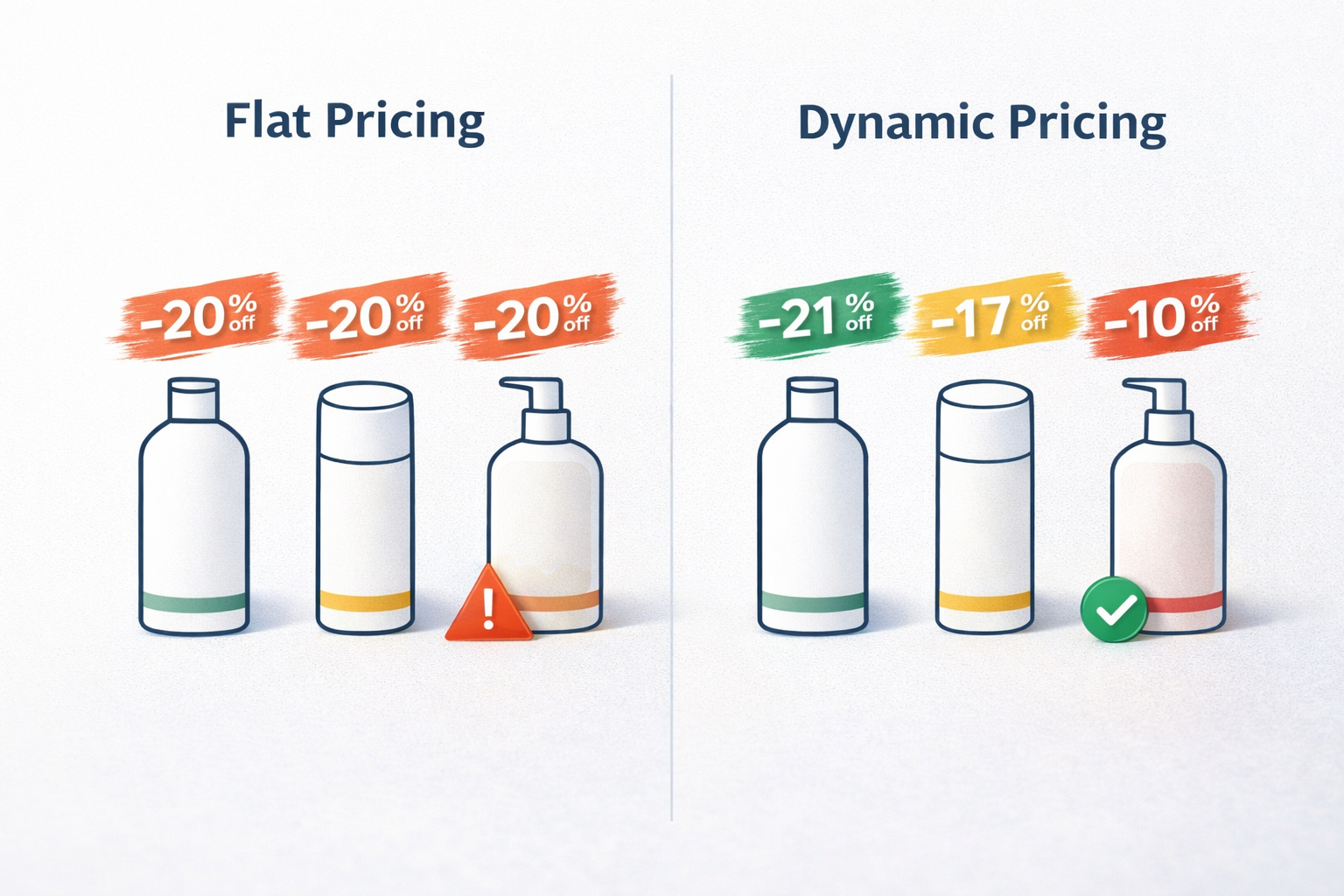
If you sell products with uneven margin profiles, you should at least ensure your bundle builder gives you pricing control beyond “one flat discount on everything.”
Fixed bundles assume customers want exactly what you chose. That’s often not true.
A huge amount of incremental revenue comes from the customer who wants the base bundle… plus one more thing.
Add-ons matter because they let you keep the core decision simple (“this is the set”), while offering optional upgrades without creating endless separate bundle products.
Examples:
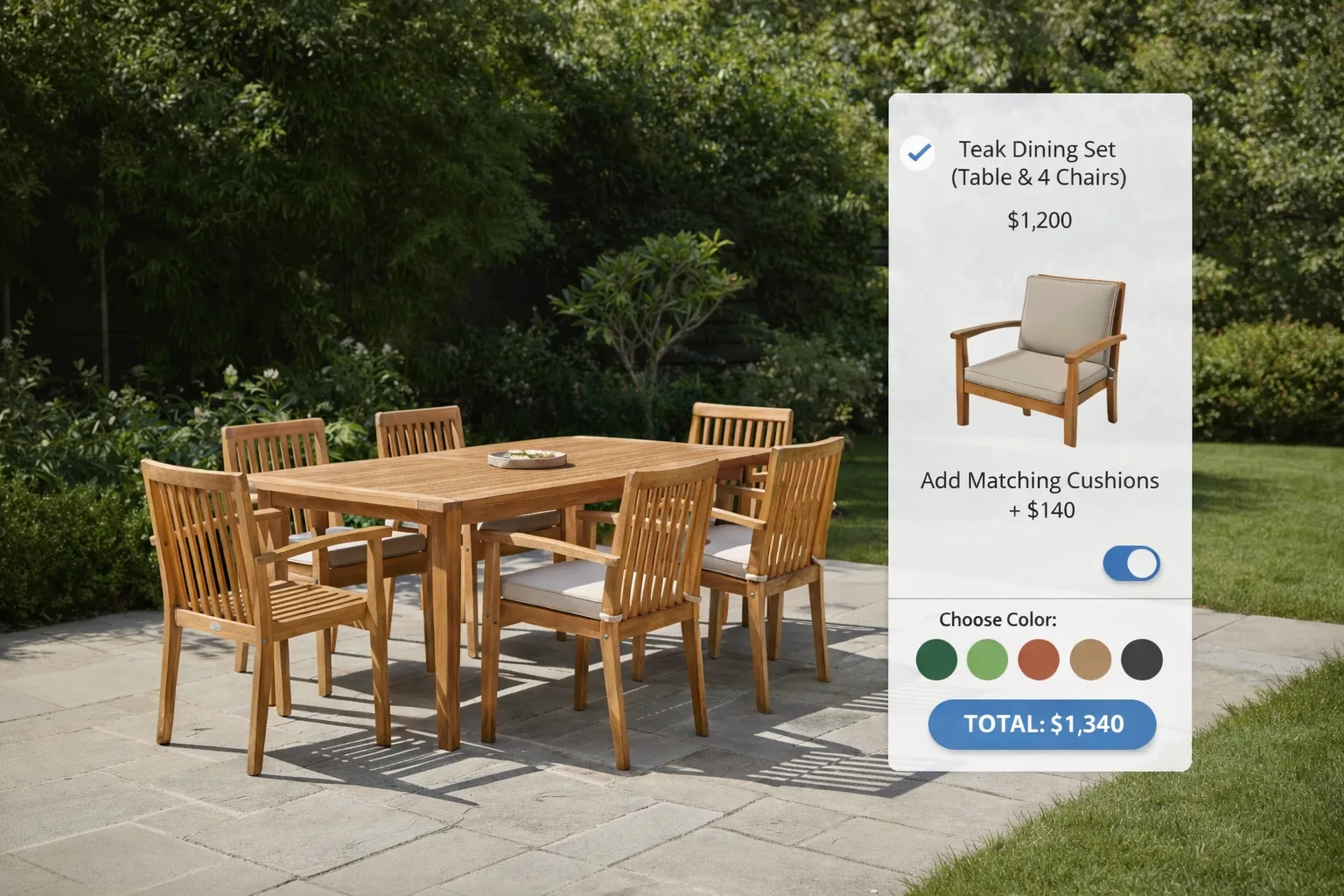
The best add-on systems keep the experience coherent:
This is one of the cleanest ways to increase AOV without bloating your catalog.
This is the feature most merchants don’t realize they need—until their bundle revenue is meaningful and the reporting becomes unintelligible.
The problem looks like this:
Your analytics dashboard shows “Blue T-shirt (M)” and “White socks (3-pack)” sold. But you can’t tell they were sold together as “Summer Basics Bundle” at a 15% discount. Your external systems don’t know the product bundle existed. They only know individual SKUs sold.
That missing context makes it hard to answer basic business questions:
Look for a bundle builder that can preserve bundle relationships as structured data attached to the order—ideally in a format external systems can parse cleanly (JSON is the practical standard).
If bundles aren’t operationally predictable, they become a constant source of friction:
If you want to learn more about bundles and your backend systems working in harmony, check out this video:
A bundle builder should support the operational reality that Shopify bundles create:
A. Fulfillment clarity
B. Shipping accuracy
Shopify calculates shipping based on component weight/dimensions/origin. If component data is wrong or bundles trigger multi-origin fulfillment, shipping becomes the largest hidden cost in your bundle program.
C. Returns logic
Bundles force you to define policies:
You don’t need one app to solve your entire returns policy, but your bundle structure must not make returns impossible to reconcile.
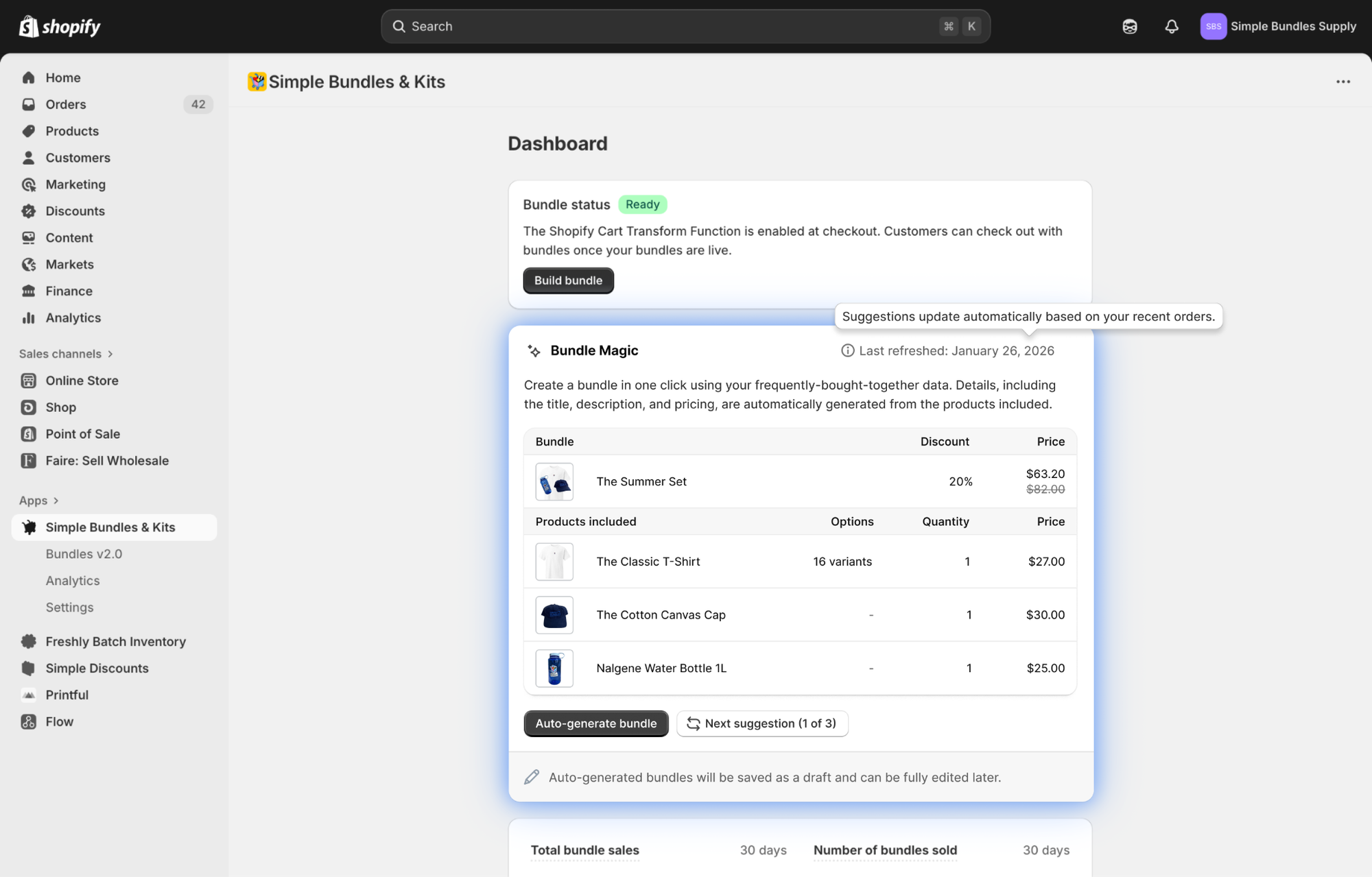
Simple Bundles is designed for brands that want beautiful, fully customizable bundle experiences—from mix-and-match, BOGO, free gift with purchase, and more—without sacrificing inventory accuracy, fulfillment reliability, or Shopify-native behavior.
Simple Bundles has a free plan that lets you create up to three bundles of any type. You can install our app here.
A Shopify bundle app should support SKU-level inventory syncing, mix-and-match bundles, fulfillment-safe order processing, analytics tracking, customizable bundle layouts, and accurate shipping calculations.
Many Shopify bundle apps fail to properly map bundle components to individual SKUs, which can lead to overselling, inaccurate inventory counts, and fulfillment errors. Simple Bundles fixes this issue by breaking bundles down in the cart, so individual components are synced to your fulfillment, warehouse, and other backend systems.
Shopify supports basic bundles, but many merchants use dedicated bundle apps for advanced features like mix-and-match bundles, SKU syncing, analytics visibility, and fulfillment workflows.
SKU-level inventory mapping ensures that when a bundle sells, Shopify deducts inventory from the exact component SKUs included in the bundle rather than from a separate bundle inventory pool.
Learn how Shopify brands increase AOV without relying on constant discounts using bundles, upsells, free shipping thresholds, and smarter merchandising.
This guide covers 10 important questions every brand should ask before signing with an agency. From understanding their experience with Shopify and CRO to evaluating reporting, retention strategies, paid media expertise, and communication processes.
This guide explains how to create free gift with purchase promotions on Shopify using native discounts, bundle apps, and automation tools. Learn how to add gifts automatically, boost AOV with cart upsells, and create a smoother customer experience.

